TimeLine Automation.
Server automations for TimeLine ERP – written by AI from a description, tested before they go live, run safely on the server.
Every company has its recurring chores in the ERP: incoming order PDFs to enter, data to reconcile at night, documents to file, reminders to send. TimeLine Automation turns them into small, versioned C# scripts that the TimeLine server runs on its own – on a schedule, when a file arrives or from a workflow. An AI agent writes the script from your description; nothing goes live until it has passed a dry run and an administrator has approved it.
A trigger, a tested script, a result.
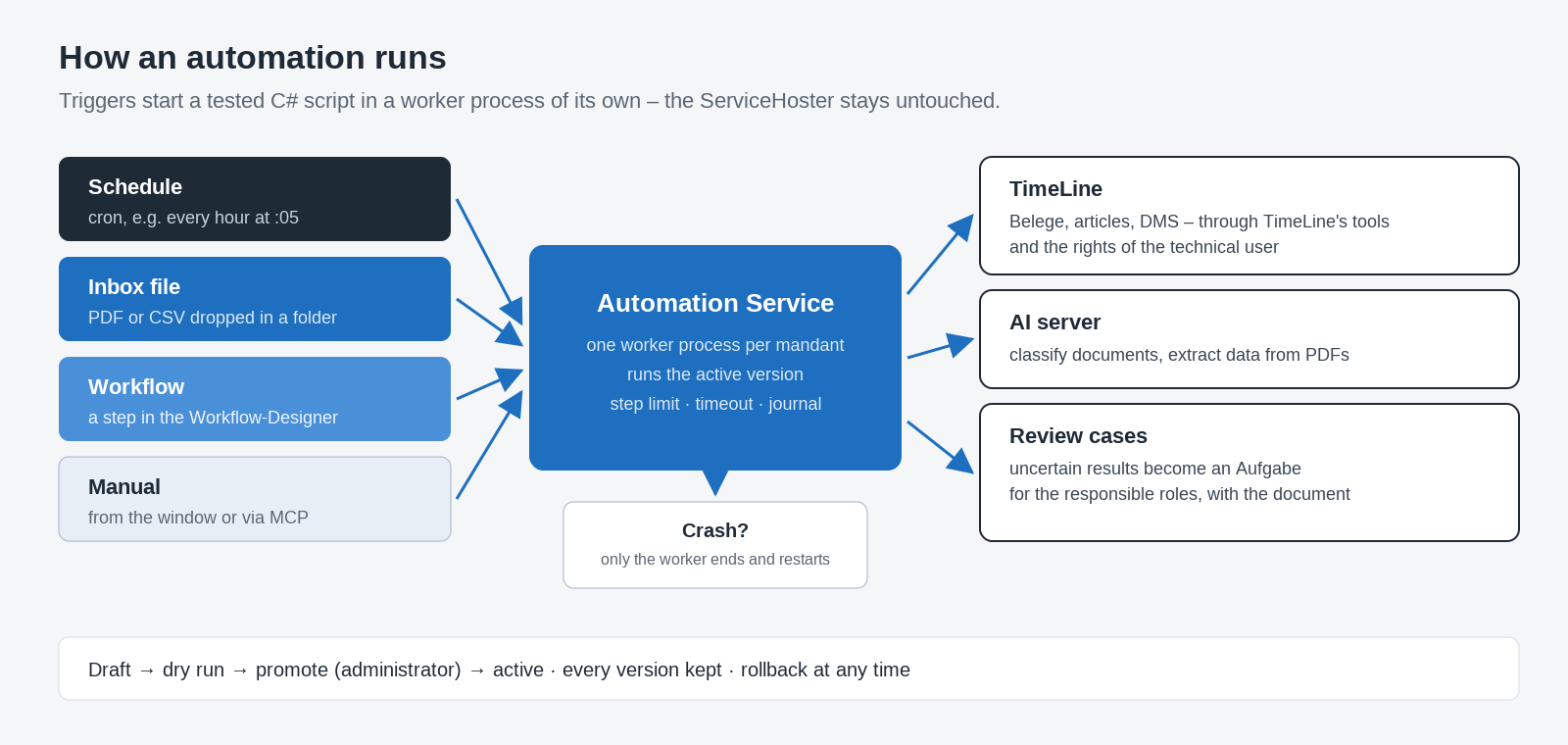
Schedules, files, workflows or a click start the active version of an automation. The Automation Service runs it in a worker process of its own per mandant and works with TimeLine through its own tools and rights. What the script is unsure about goes to people as a review case.
What it does.
Written from a description
An AI agent writes the script through TimeLine's MCP server. You read the code and decide what goes live.
Schedules, files, workflows
Cron schedules, files dropped into an inbox folder, a step in the Workflow-Designer – or simply by hand.
TimeLine's own tools
Belege, articles and the DMS through the same tools as TimeLine's AI assistant, limited to the rights of a technical user.
Reads documents
With the TimeLine AI server: classify incoming PDFs, extract order data, attach the file to the Beleg.
Review cases
What the script cannot decide becomes an Aufgabe for the responsible roles, with the document – nothing is booked on a guess.
Inside the TimeLine client
Windows for automations, run log, review cases and settings, plus Infocenter widgets for the open work.
From idea to production in five steps.
Every automation has versions. A new version only replaces the running one after it has proven itself – and the previous one stays available.
Describe
Tell the AI agent what should happen and when.
Draft
The script is saved as a new version and compiled.
Dry run
Runs on real data; every write is only a preview.
Promote
An administrator approves the tested version.
Operate
Run log, review cases, rollback at any time.
Safe in operation.
Its own process
Each mandant's automations run in a worker process of their own. A crash ends only that process; it restarts, and the TimeLine ServiceHoster keeps running.
Bounded runs
Step limit, timeout and input limits per automation, so a faulty script cannot run away.
No double bookings
Every write is journaled; a repeated run replays what was already done instead of doing it twice.
Stops on repeated failure
After several failed runs in a row the automation pauses, and the responsible people get an Aufgabe.
Only administrators go live
Promoting, pausing and changing automations is reserved for administrators; every run is logged.
A TimeLine package
Installed with the TimeLine Customization Manager, database updates through tsm, the service in the ServiceHoster.
Built for TimeLine users.
Less manual entry
Orders from PDFs, reconciliations and reminders run on their own; people decide the exceptions.
Under control
Versioned, tested, approved by an administrator and isolated from the TimeLine server.
Projects without a new module
Migrations, interfaces and customer-specific jobs as automations instead of compiled customizations.
Let's talk.
We will gladly show you TimeLine Automation on your own processes and help you find the first automation worth building.

